# Suspensive - Full Documentation
---
## introduction
URL: /docs/introduction
React gives you Suspense, lazy, and an interface to build Error Boundaries. But if you've tried to use them in a real application, you know the gaps — no built-in way to skip SSR for a Suspense boundary, implementing Error Boundaries from scratch requires boilerplate, and there's no way to coordinate any of it. Beyond React itself, data-fetching libraries and state managers have their own gaps too.
**Suspensive fills those gaps.** It provides declarative components and hooks that make async rendering, error handling, and data fetching work the way they should — with less code and fewer workarounds.
```mermaid
graph LR;
subgraph GAP1 ["React"]
direction TB
subgraph GAP1_S ["Suspense"]
direction TB
A["No built-in way to skip SSR in Suspense"]
D["Loading spinners flash on fast responses"]
E["Hydration mismatches on client-only content"]
F["Same fallback prop repeated across components"]
end
subgraph GAP1_E ["Error Boundary"]
direction TB
B1["No built-in ErrorBoundary component"]
B2["Complex class component boilerplate"]
B3["Fallback errors cause infinite recursion"]
B4["No way to catch only specific error types"]
B5["No hook to access error and reset in fallback"]
C["Resetting multiple ErrorBoundaries requires manual wiring"]
end
subgraph GAP1_L ["Lazy & Code Splitting"]
direction TB
G["No way to preload lazy components before render"]
G2["Chunk load failures crash the app"]
end
end
subgraph GAP2 ["TanStack Query"]
direction TB
H["Hooks force component splits for Suspense"]
I["SSR prefetching requires repetitive boilerplate"]
J["Server prefetching failures are swallowed silently"]
K["QueryClient leaks data across SSR requests"]
end
subgraph GAP3 ["Jotai"]
direction TB
L["Hooks hide which atoms trigger Suspense"]
M["Extension atoms behavior not visible in JSX"]
end
subgraph JOTAI ["@suspensive/jotai"]
direction TB
Z["Atom, AtomValue, SetAtom"]
Y["tRPC, Query, Cache compatible"]
end
subgraph RQ ["@suspensive/react-query"]
direction TB
W["SuspenseQuery, Mutation, PrefetchQuery"]
V["QueriesHydration"]
U["skipSsrOnError + timeout"]
T["createGetQueryClient"]
end
subgraph REACT ["@suspensive/react"]
direction TB
subgraph REACT_L ["Lazy"]
direction TB
LL["lazy — .load()"]
LL2["reloadOnError"]
end
subgraph REACT_E ["ErrorBoundary"]
direction TB
R["ErrorBoundary — fallback"]
R2["shouldCatch"]
R3["fallback error propagation"]
R4["useErrorBoundaryFallbackProps"]
Q["ErrorBoundaryGroup"]
end
subgraph REACT_S ["Suspense"]
direction TB
S["Suspense — clientOnly"]
P["Delay — ms"]
O["ClientOnly"]
N["DefaultPropsProvider"]
end
end
A --> S
D --> P
E --> O
F --> N
B1 --> R
B2 --> R
B3 --> R3
B4 --> R2
B5 --> R4
C --> Q
G --> LL
G2 --> LL2
H --> W
I --> V
J --> U
K --> T
L --> Z
M --> Y
click S "/docs/react/Suspense"
click P "/docs/react/Delay"
click O "/docs/react/ClientOnly"
click N "/docs/react/DefaultPropsProvider"
click R "/docs/react/ErrorBoundary"
click R2 "/docs/react/ErrorBoundary"
click R3 "/docs/react/ErrorBoundary"
click R4 "/docs/react/ErrorBoundary"
click Q "/docs/react/ErrorBoundaryGroup"
click LL "/docs/react/lazy"
click LL2 "/docs/react/lazy"
click W "/docs/react-query/SuspenseQuery"
click V "/docs/react-query/QueriesHydration"
click U "/docs/react-query/QueriesHydration"
click T "/docs/react-query/createGetQueryClient"
click Z "/docs/jotai/Atom"
click Y "/docs/jotai/Atom"
style S color:#1AA3FF,text-decoration:underline
style P color:#1AA3FF,text-decoration:underline
style O color:#1AA3FF,text-decoration:underline
style N color:#1AA3FF,text-decoration:underline
style R color:#1AA3FF,text-decoration:underline
style R2 color:#1AA3FF,text-decoration:underline
style R3 color:#1AA3FF,text-decoration:underline
style R4 color:#1AA3FF,text-decoration:underline
style Q color:#1AA3FF,text-decoration:underline
style LL color:#1AA3FF,text-decoration:underline
style LL2 color:#1AA3FF,text-decoration:underline
style W color:#1AA3FF,text-decoration:underline
style V color:#1AA3FF,text-decoration:underline
style U color:#1AA3FF,text-decoration:underline
style T color:#1AA3FF,text-decoration:underline
style Z color:#1AA3FF,text-decoration:underline
style Y color:#1AA3FF,text-decoration:underline
```
> **Info:** **Ready to get started?** Follow the [Getting Started guide](/docs/react/getting-started) to set up Suspensive in 5 minutes, or see how it compares to [react-error-boundary](/docs/react/comparison).
---
## Motivation
URL: /docs/react/motivation
# Motivation
React already has great primitives — Suspense, ErrorBoundary, lazy. But using them in real applications quickly exposes gaps. @suspensive/react fills those gaps.
### Skip SSR for a Suspense boundary when you need to
React's `` works with SSR and streaming. Sometimes you still want a boundary to render **only on the client** — show `fallback` on the server and mount `children` after hydration (client-only APIs, widgets, or gradual migration). React does not ship a built-in flag for that; teams often reach for `dynamic(..., { ssr: false })` or manual guards.
With Suspensive's [``](/docs/react/Suspense), one prop declares that intent — no extra wrappers.
### ErrorBoundary is too complicated
`react-error-boundary` offers three different fallback interfaces. With Suspensive's [``](/docs/react/ErrorBoundary), you get one `fallback` prop, plus `shouldCatch` to filter which errors to handle.
### Resetting ErrorBoundaries is painful
Managing `resetKeys` across multiple ``s is tedious. With Suspensive's [``](/docs/react/ErrorBoundaryGroup), a single call resets all of them.
### Loading spinners flash
A spinner that appears for 50ms is worse than no spinner. With Suspensive's [``](/docs/react/Delay), brief loading states are hidden so users only see spinners when they actually need to wait.
### Client-only code causes hydration mismatches
With Suspensive's [``](/docs/react/ClientOnly) and [`useIsClient`](/docs/react/useIsClient), you get safe client-side rendering — no more `typeof window !== 'undefined'` scattered across your code.
### Same props, everywhere
Stop passing the same `fallback` to every ``. With Suspensive's [``](/docs/react/DefaultPropsProvider), you set defaults once for all Suspensive components.
### `React.lazy` can't preload or recover
With Suspensive's [`lazy`](/docs/react/lazy), you get `.load()` for preloading and automatic retry on chunk failures — the kind of thing you only discover you need in production.
---
## Installation
URL: /docs/react/installation
# Installation
### Check supported browsers
Suspensive Libraries are optimized for modern browsers. It is compatible with the following browsers config.
{[
{ browser: 'Chrome', version: '>= 51' },
{ browser: 'Firefox', version: '>= 53' },
{ browser: 'Edge', version: '>= 18' },
{ browser: 'Safari', version: '>= 11' },
{ browser: 'iOS', version: '>= 11' },
{ browser: 'Opera', version: '>= 38' },
].map((item) => (
{item.browser}
{item.version}
))}
> Depending on your environment, you might need to add polyfills. If you want to support older browsers, you need to transpile the library from node_modules yourselves.
### Check supported react version
{[{ library: 'react', version: '^18 || ^19' }].map((item) => (
{item.library}
{item.version}
))}
### Add as Dependencies
@suspensive/react lives in npm. To install the latest stable version, run the following command.
```shell npm2yarn
npm install @suspensive/react
```
---
## Getting Started
URL: /docs/react/getting-started
# Getting Started
Build your first async-safe React page with Suspensive in 3 minutes.
### Install packages
```shell npm2yarn
npm install @suspensive/react
```
### Wrap your app with ErrorBoundary and Suspense
Replace manual loading/error state checks with declarative boundaries:
```tsx
import { ErrorBoundary, Suspense } from '@suspensive/react'
function App() {
return (
(
Something went wrong: {error.message}
)}
>
Loading...}>
)
}
```
### Skip SSR with clientOnly
When a subtree should not be server-rendered, use `clientOnly` on ``:
```tsx
import { Suspense } from '@suspensive/react'
function Page() {
return (
} clientOnly>
)
}
```
### Group error boundaries for coordinated resets
Reset multiple error boundaries at once without prop drilling:
```tsx
import { ErrorBoundary, ErrorBoundaryGroup } from '@suspensive/react'
function Dashboard() {
return (
{({ reset }) => }
}>
}>
)
}
```
## Next Steps
- **[``](/docs/react/Suspense)** — Suspense with `clientOnly` to skip SSR for a boundary, plus DefaultProps support
- **[``](/docs/react/ErrorBoundary)** — Advanced error handling with shouldCatch filtering
- **[Suspensive vs react-error-boundary](/docs/react/comparison)** — Detailed feature comparison
---
## Suspensive vs Other Error Boundary Libraries
URL: /docs/react/comparison
# Suspensive vs Other Error Boundary Libraries
How `@suspensive/react` compares to `react-error-boundary`, `@sentry/react`, and DIY class components — and what Suspensive offers beyond ErrorBoundary.
## Feature Comparison
## What Makes Suspensive Different
### shouldCatch — Catch Only the Errors You Want
Unlike any other solution, `@suspensive/react` lets you filter which errors an ErrorBoundary catches. Pass an Error constructor, a callback, or a boolean:
```tsx
// Only catch validation errors in this boundary
}>
// Catch everything except network errors
!(error instanceof NetworkError)}
fallback={}
>
```
This enables layered error handling strategies where parent and child boundaries handle different error types — something impossible with `react-error-boundary`.
### ErrorBoundaryGroup — Reset Multiple Boundaries at Once
Managing multiple error boundaries? With `react-error-boundary`, you need to pass `resetKeys` through props to every boundary. With Suspensive, just wrap them in an `ErrorBoundaryGroup`:
```tsx
{({ reset }) => }
}>
}>
```
No prop drilling. No state management. All boundaries reset together.
### Safe Fallback Error Handling
In `react-error-boundary`, if your fallback component throws an error, it causes a recursive catch loop. In `@suspensive/react`, errors thrown in fallback components are passed to the **parent** ErrorBoundary — providing predictable, safe error propagation.
### useErrorBoundaryFallbackProps — No Prop Drilling in Fallbacks
Access `error` and `reset` anywhere inside a fallback tree without passing props:
```tsx
const DeepFallbackChild = () => {
const { error, reset } = useErrorBoundaryFallbackProps()
return
}
```
This is especially useful in React Server Component environments where you can't pass callback functions as props.
## Beyond ErrorBoundary
Suspensive isn't just a better ErrorBoundary. In production, error handling is only one piece — you also need to manage loading states, SSR hydration, and data fetching. These concerns are interconnected, and Suspensive handles them all in one package.
### clientOnly — skip SSR for a Suspense boundary
React's `` works with SSR. When you want a boundary to render only on the client, Suspensive's `clientOnly` prop shows `fallback` on the server and `children` on the client — in one line:
```tsx
} clientOnly>
```
No `dynamic(() => import(...), { ssr: false })`. No `useEffect` guards.
### Delay — Prevent Flash-of-Loading
Fast responses shouldn't show a spinner. `` holds back the loading UI until it's actually needed:
```tsx
{({ isDelayed }) => (
)}
}
>
```
### DefaultPropsProvider — Global Defaults
Set default fallbacks for every `` and `` in your app:
```tsx
const defaultProps = new DefaultProps({
Suspense: { fallback: },
Delay: { ms: 200 },
})
```
### SuspenseQuery — Declarative Data Fetching
With `@suspensive/react-query`, fetch data as JSX without hooks or wrapper components:
```tsx
}>
}>
{({ data: user }) => }
```
No `useSuspenseQuery` hook constraints. No component splitting. Everything at the same depth.
## Code Comparison
#### @suspensive/react
```tsx
import { ErrorBoundary } from '@suspensive/react'
const App = () => (
(
)}
onError={(error) => logToService(error)}
>
)
```
## Migration from react-error-boundary
Migrating is straightforward — the API is similar by design:
| react-error-boundary | @suspensive/react |
| --------------------------------------------------- | ---------------------- |
| `fallbackRender` / `FallbackComponent` / `fallback` | `fallback` (unified) |
| `resetErrorBoundary` | `reset` |
| `withErrorBoundary()` | `ErrorBoundary.with()` |
| `useErrorBoundary()` | `useErrorBoundary()` |
```bash
npm install @suspensive/react
```
See the full [ErrorBoundary API reference](/docs/react/ErrorBoundary) for detailed documentation.
---
## Suspense
URL: /docs/react/Suspense
# Suspense
@suspensive/react's `` is a drop-in replacement for [React's Suspense](https://react.dev/reference/react/Suspense) — with additional features that solve real-world problems.
## When to use this instead of React.Suspense
| | React.Suspense | @suspensive/react Suspense |
| -------------------------------------------------- | -------------- | -------------------------- |
| Basic suspense boundary | ✅ | ✅ |
| Skip SSR for a boundary (`clientOnly`) | ❌ | ✅ |
| Global default fallback via `DefaultPropsProvider` | ❌ | ✅ |
| HOC pattern (`Suspense.with`) | ❌ | ✅ |
React's `` works with SSR. When you want a boundary to **skip server rendering** — show `fallback` on the server and render `children` only on the client — Suspensive's `clientOnly` prop declares that in one line. No `dynamic(() => import(...), { ssr: false })` or manual `useEffect` guards.
---
### props.fallback
fallback works the same as the fallback of React's original Suspense.
```tsx /Suspense/
import { Suspense } from '@suspensive/react'
const Example = () => (
}>
)
```
> **Note:** Default fallback
>
> `` are more powerful when used with ``.
> Control multiple ``s default fallback with ``. Details are introduced in [`` page](/docs/react/DefaultPropsProvider).
### Avoid Server side rendering (clientOnly)
If you use the clientOnly prop, `` returns the fallback on the server and children on the client. It does not rely on `useEffect` or mount timing — instead, it distinguishes server and client via `getServerSnapshot` and `getSnapshot` from `useSyncExternalStore`, so children are not server-side rendered.
```tsx /clientOnly/
import { Suspense } from '@suspensive/react'
const Example = () => (
}>
)
```
When using the clientOnly prop, the useIsClient hook is used internally, and useIsClient uses getSnapshot and getServerSnapshot of useSyncExternalStore to ensure that it is a client.
```tsx /useIsClient/
const useIsClient = () =>
useSyncExternalStore(emptySubscribe, getSnapshot, getServerSnapshot)
const emptySubscribe = () => noop
const getSnapshot = () => true
const getServerSnapshot = () => false
```
https://x.com/TkDodo/status/1741068994981826947?t=XmG17etMUL2m0JFim03vqw&s=19
> **Info:** Migration support SSR gradually (`` -> ``)
>
> If you want to use Suspense working in both SSR/CSR, you can change `` to `` gradually.
## Suspense.with
`Suspense.with` is a higher-order component (HOC) that allows you to wrap a component with a Suspense boundary.
`Suspense.with` makes it easy to wrap a component.
```tsx /Suspense.with/
import { Suspense } from '@suspensive/react'
const Example = Suspense.with({ fallback: }, () => {
// code that triggers suspense
return <>...
})
```
---
## ErrorBoundary
URL: /docs/react/ErrorBoundary
# ErrorBoundary
This component can handle any errors in children.
## Comparison
`@suspensive/react`'s `` provides a declarative, feature-rich alternative to React's class-based error boundaries and popular error boundary libraries like `react-error-boundary` and `@sentry/react`.
#### @suspensive/react
```tsx
import { ErrorBoundary } from '@suspensive/react'
const SuspensiveExample = () => (
(
)}
>
)
```
### Key Advantages of @suspensive/react
1. **Advanced Error Filtering with shouldCatch**: Unlike other solutions, `@suspensive/react` allows you to conditionally catch specific errors using boolean, ErrorConstructor, or callback matchers. This enables sophisticated error handling strategies where parent and child ErrorBoundaries can handle different error types.
2. **Proper Fallback Error Handling**: Unlike `react-error-boundary`, errors thrown in fallback components are passed to the parent ErrorBoundary instead of being caught recursively by the same boundary. This prevents infinite fallback loops and provides more predictable error handling behavior. [Learn more](/docs/react/migration/migrate-to-v3#now-thrown-error-in-errorboundary-fallback-will-be-passed-to-parent-1409)
3. **useErrorBoundaryFallbackProps**: Eliminates prop drilling in fallback components by providing direct access to `error` and `reset` through a hook, making deeply nested fallback UIs much cleaner.
4. **ErrorBoundaryGroup**: Manage and reset multiple ErrorBoundaries together, perfect for complex UIs with multiple error boundaries that need coordinated reset behavior.
5. **Better TypeScript Support**: Advanced type inference for error types based on shouldCatch configuration, providing better autocomplete and type safety.
6. **No Class Components Required**: Unlike native React error boundaries, you can use a fully declarative, function component-based approach without writing class components.
### Migration Guide
#### From react-error-boundary
If you're using react-error-boundary, migrating to `@suspensive/react` is straightforward:
```tsx
// react-error-boundary
import { ErrorBoundary } from 'react-error-boundary'
const ReactErrorBoundaryExample = () => (
(
)}
onReset={() => console.log('reset')}
>
)
```
Main API differences:
- `fallback`, `fallbackRender`, `FallbackComponent` → `fallback`
- `resetErrorBoundary` → `reset` (in fallback props)
#### @sentry/react
If you're using `@sentry/react`, migrating to `@suspensive/react` is straightforward:
```tsx
// @sentry/react
import * as Sentry from '@sentry/react'
const SentryExample = () => (
(
{error.message}
)}
onError={(error, componentStack, eventId) => {
// Error automatically sent to Sentry
console.log('Error caught:', eventId)
}}
>
)
// @suspensive/react - with manual Sentry integration
import { ErrorBoundary } from '@suspensive/react'
import * as Sentry from '@sentry/react'
const SuspensiveExample = () => (
(
{error.message}
)}
onError={(error, errorInfo) => {
const eventId = Sentry.captureReactException(error, errorInfo)
console.log('Error caught:', eventId)
}}
>
)
```
Main differences:
- `@sentry/react` automatically reports errors to Sentry
- `@suspensive/react` provides more flexible error handling with `shouldCatch`
- `resetError` → `reset` (in fallback props)
- Manual Sentry integration gives you more control over what gets reported
#### From React Class Component
If you're using React class components for error boundaries, `@suspensive/react` provides a much simpler declarative API:
```tsx
// React Class Component
class ErrorBoundary extends Component {
state = { hasError: false, error: null }
static getDerivedStateFromError(error) {
return { hasError: true, error }
}
componentDidCatch(error, errorInfo) {
logErrorToService(error, errorInfo)
}
reset = () => {
this.setState({ hasError: false, error: null })
}
render() {
if (this.state.hasError) {
return
}
return this.props.children
}
}
// @suspensive/react - much simpler!
import { ErrorBoundary } from '@suspensive/react'
const SuspensiveExample = () => (
(
)}
onError={(error, errorInfo) => logErrorToService(error, errorInfo)}
>
)
```
---
### props.fallback
If there is any thrown error in children of ``, Error will be caught and then fallback will be rendered.
```tsx /fallback/
import { ErrorBoundary } from '@suspensive/react'
import { useState, useEffect } from 'react'
const Example = () => (
(
<>
{props.error.message}
)}
>
)
```
> **Info:** Define component as ``'s fallback
>
> #### ErrorBoundaryFallbackProps
>
> If you want to deliver a declared component as ``'s fallback, you can use the `ErrorBoundaryFallbackProps` type to declare the component easily.
>
> ```tsx /ErrorBoundaryFallbackProps/
import type { ErrorBoundaryFallbackProps } from '@suspensive/react'
const ErrorBoundaryFallback = ({
reset,
error,
}: ErrorBoundaryFallbackProps) => (
<>
{error.message}
)
const Example = () => (
)
```
### props.resetKeys
If you want to reset `` by a component that is outside of ``'s fallback. Pass any resetKey into resetKeys. resetKeys work only when at least one element of array is changed. you don't need to worry about providing a new array as resetKeys like how useEffect's dependency array work.
```tsx /resetKeys/
import { ErrorBoundary } from '@suspensive/react'
import { useState } from 'react'
const Example = () => {
const [resetKey, setResetKey] = useState(0)
return (
<>
)
}
```
### props.onReset
This is a callback that is called first when `` reset. It can be used with @tanstack/react-query as follows.
```tsx /onReset/
import { ErrorBoundary } from '@suspensive/react'
import { QueryErrorResetBoundary } from '@tanstack/react-query'
const Example = () => (
{({ reset }) => (
(
<>
{props.error.message}
)}
>
)}
)
```
### props.onError
This is a callback called when `` catches an error.
```tsx /onError/
import { ErrorBoundary } from '@suspensive/react'
const logError = (error: Error, info: ErrorInfo) => {
// ...
}
const Example = (
)
```
### props.shouldCatch — Unique to Suspensive
> **Info:** **Not available in react-error-boundary or @sentry/react.** `shouldCatch` is a feature unique to `@suspensive/react` that enables layered error handling — parent and child ErrorBoundaries can handle different error types. See the [full comparison](/docs/react/comparison).
shouldCatch determines whether `` should catch errors based on conditions.
It accepts three criteria: Boolean, ErrorConstructor, and Callback, and defaults to true.
#### ErrorConstructor
```tsx /shouldCatch/
import { ErrorBoundary } from '@suspensive/react'
import { useState, useEffect, createElement } from 'react'
export const Example = () => {
return (
(
<>Parent ErrorBoundary fallback: {error.message}
)}
>
(
<>Child ErrorBoundary fallback: {error.message}
)}
>
)
}
```
#### Callback
```tsx /shouldCatch/
import { ErrorBoundary } from '@suspensive/react'
import { useState, useEffect, createElement } from 'react'
export const Example = () => {
return (
(
<>Parent ErrorBoundary fallback: {error.message}
)}
>
error instanceof CustomError}
fallback={({ error }) => (
<>Child ErrorBoundary fallback: {error.message}
)}
>
)
}
```
#### Boolean
```tsx /shouldCatch/
import { ErrorBoundary } from '@suspensive/react'
import { useState, useEffect, createElement } from 'react'
export const Example = () => {
return (
(
<>Parent ErrorBoundary fallback: {error.message}
)}
>
(
<>Child ErrorBoundary fallback: {error.message}
)}
>
)
}
```
You can also apply multiple criteria through an array.
```tsx /shouldCatch/
import { ErrorBoundary } from '@suspensive/react'
import { useState, useEffect, createElement } from 'react'
const Example = () => {
return (
(
<>Parent ErrorBoundary fallback: {error.message}
)}
>
error instanceof CustomError,
]}
fallback={({ error }) => (
<>Child ErrorBoundary fallback: {error.message}
)}
>
)
}
```
## ErrorBoundary.with
`ErrorBoundary.with` is a higher-order component that wraps the component with ``.
`ErrorBoundary.with` makes it easy to wrap a component.
```tsx /ErrorBoundary.with/
import { ErrorBoundary } from '@suspensive/react'
const Example = ErrorBoundary.with({ fallback: ErrorBoundaryFallback }, () => {
const errorBoundary = useErrorBoundary()
return <>...
})
```
## useErrorBoundary
### useErrorBoundary().setError
In children of ``, we can use useErrorBoundary().setError to make `` aware of the Error without throwing.
```tsx /useErrorBoundary/
import { ErrorBoundary, useErrorBoundary } from '@suspensive/react'
import { useEffect } from 'react'
const Example = () => (
)
const SetErrorAfterFetch = () => {
const errorBoundary = useErrorBoundary()
useEffect(() => {
fetchSomething().then(
(response) => {},
(error) => errorBoundary.setError(error) // instead of throw inside
)
}, [])
return <>No error
}
```
## useErrorBoundaryFallbackProps
A hook that allows you to access the `error` object and `reset` method without prop drilling inside ``'s fallback.
In Next.js React Server Component environments, callback functions cannot be passed as props from server components to client components. This makes it impossible to pass a function component as ``'s `fallback` to receive `error` and `reset`. `useErrorBoundaryFallbackProps` allows you to access `error` and `reset` inside the fallback without this limitation.
It also eliminates the prop drilling problem when fallback components are deeply nested, removing the need to pass `error` and `reset` through multiple layers.
```tsx /useErrorBoundaryFallbackProps/
import { ErrorBoundary, useErrorBoundaryFallbackProps } from '@suspensive/react'
const ErrorBoundaryFallback = () => {
const { reset, error } = useErrorBoundaryFallbackProps()
return (
<>
{error.message}
)
}
// In RSC, you need to pass JSX directly to fallback instead of a callback
const Example = () => (
}>
)
```
> **Warning:** `useErrorBoundaryFallbackProps` must be called inside ``'s `fallback`. Calling it in ``'s `children` or outside of `` will throw an error.
---
## ErrorBoundaryGroup
URL: /docs/react/ErrorBoundaryGroup
# ErrorBoundaryGroup
This is a component for managing multiple ``s easily.
``s as children of nested `` will also be reset by parent ``.
```jsx /ErrorBoundaryGroup/
import { ErrorBoundaryGroup, ErrorBoundary } from '@suspensive/react'
const Example = () => (
{/* Resets all ErrorBoundaries that are children of ErrorBoundaryGroup. All ErrorBoundaries within nested ErrorBoundaryGroups are also reset. */}
{(group) => }
<>{props.error.message}}>
{(group) => }
<>{props.error.message}}>
)
```
### props.blockOutside
If you want to block resetting nested `` by parent ``, use blockOutside.
```jsx /blockOutside/
import { ErrorBoundaryGroup, ErrorBoundary } from '@suspensive/react'
const Example = () => (
{(group) => }
<>{props.error.message}}>
{/* blockOutside prop prevents reset by the parent ErrorBoundaryGroup. */}
{(group) => }
<>{props.error.message}}>
)
```
## ErrorBoundaryGroup.with
`ErrorBoundaryGroup.with` is a higher-order component that wraps the component with ``.
`ErrorBoundaryGroup.with` makes it easy to wrap a component.
```tsx /ErrorBoundaryGroup.with/
import { ErrorBoundaryGroup } from '@suspensive/react'
const Example = ErrorBoundaryGroup.with({}, () => {
return <>...
})
```
## ErrorBoundaryGroup.Consumer
`ErrorBoundaryGroup.Consumer` is a consumer of ``. You can use `ErrorBoundaryGroup.Consumer` to use reset of ``.
```tsx /ErrorBoundaryGroup.Consumer/
import { ErrorBoundaryGroup } from '@suspensive/react'
const Example = () => (
{(group) => }
)
```
## useErrorBoundaryGroup
If you use useErrorBoundaryGroup, you can get a function to reset ``s in ``.
```tsx /useErrorBoundaryGroup/
import { useErrorBoundaryGroup } from '@suspensive/react'
const Example = () => {
const group = useErrorBoundaryGroup()
return
}
```
---
## Delay
URL: /docs/react/Delay
# Delay
## Why Delay?
When data loads fast (under 200ms), showing a spinner creates a **flash-of-loading-state** — a brief flicker that feels broken rather than responsive. `` solves this by holding back the loading UI until it's actually needed.
**Recommended `ms` values:**
- **100–300ms** for most UI — hides spinners on fast networks, shows them on slow ones
- **500ms+** for non-critical sections where delayed feedback is acceptable
`` is designed to work with ``:
```tsx
{({ isDelayed }) => (
)}
}
>
```
Using the render prop pattern with `isDelayed` enables smooth fade-in transitions instead of abrupt appearances.
---
## Usage
This component can be used in two ways:
1. Delay the exposure of children.
2. If children is a render prop, it passes a flag at the delayed time.
### props.ms
#### 1. Delay the exposure of children
This component delays the exposure of children by ms. In the code below, exposure of children is delayed by 200ms.
```tsx /ms/
import { Delay } from '@suspensive/react'
const Example = () => (
)
```
#### 2. Pass a delayed flag to children
If children is a render prop, it passes a flag instead of controlling the exposure. In the code below, `isDelayed` is passed as true after 200ms.
```tsx /ms/
import { Delay } from '@suspensive/react'
export const Example = () => {
return (
{({ isDelayed }) => (
)}
)
}
```
> **Info:** Delayed loading UI sometimes provides better usability
>
> ```tsx /Delay/
import { Delay, Suspense } from '@suspensive/react'
const Example = () => (
}
>
...
)
```
> **Note:** Default ms
>
> `` are more powerful when used with ``. Control multiple ``s default ms with ``. Details are introduced in [`` page](/docs/react/DefaultPropsProvider).
### props.fallback
fallback will be shown before the delayed exposure of children.
```jsx /fallback/
import { Delay } from '@suspensive/react'
const Example = () => (
Fallback Text}>
200ms delayed Text
)
```
## Delay.with
`Delay.with` is a higher-order component (HOC) that wraps a component using `Delay`.
`Delay.with` makes it easy to wrap a component.
```tsx /Delay.with/
import { Delay } from '@suspensive/react'
const Example = Delay.with({ ms: 2000 }, () => {
return <>...
})
```
---
## ClientOnly
URL: /docs/react/ClientOnly
# ClientOnly
This component renders children only in the client environment and renders the fallback on the server. You can set an appropriate fallback to enhance the user experience as needed.
`ClientOnly` is implemented using the [`useIsClient`](/docs/react/useIsClient) hook internally to detect the execution environment.
```tsx /ClientOnly/
import { ClientOnly } from '@suspensive/react'
const Example = () => (
Loading...}>
This will only be rendered on the client side.
)
```
## ClientOnly.with
`ClientOnly.with` is a higher-order component (HOC) that wraps a component using `ClientOnly`.
`ClientOnly.with` makes it easy to wrap a component.
```tsx /ClientOnly.with/
import { ClientOnly } from '@suspensive/react'
const Example = ClientOnly.with({ fallback: <>server }, () => {
return <>client
})
```
---
## DefaultPropsProvider
URL: /docs/react/DefaultPropsProvider
# DefaultPropsProvider
This component controls the settings of the components provided by Suspensive (Suspense, Delay, etc.) at once.
```jsx /DefaultPropsProvider/ /DefaultProps/
import { DefaultProps, DefaultPropsProvider } from '@suspensive/react'
const defaultProps = new DefaultProps({
Delay: {
ms: 1200,
},
Suspense: {
fallback: ,
clientOnly: false,
},
})
function App() {
return (
...
)
}
```
---
## lazy
URL: /docs/react/lazy
# lazy
> **Experimental:** `lazy` is an experimental feature, so this interface may change.
The `lazy` function is a wrapper around React's `lazy` function that provides callbacks for component loading success and failure. It allows you to execute custom logic when a component loads successfully or fails, providing better user experience and debugging capabilities.
### Preloading Components
By default, `lazy` works the same as React's `lazy` but provides an additional `load` method.
```tsx /Component.load/
import { lazy, Suspense } from '@suspensive/react'
const Component = lazy(() => import('./Component'))
function PreloadExample() {
return (
Loading...
}>
)
}
```
### Success/Error Callbacks
```tsx /onSuccess/ /onError/
import { lazy, Suspense, ErrorBoundary } from '@suspensive/react'
const UserProfile = lazy(() => import('./UserProfile'), {
onSuccess: () => console.log('Component loaded successfully'),
onError: ({ error }) => console.error('Loading failed:', error),
})
function App() {
return (
Something went wrong}>
Loading...}>
)
}
```
## createLazy
Creates a lazy function with custom default options.
```tsx /createLazy/
import { createLazy } from '@suspensive/react'
const lazy = createLazy({
onSuccess: () => console.log('Component loaded successfully'),
onError: ({ error }) => console.error('Component loading failed:', error),
})
const Component = lazy(() => import('./Component'))
```
### Callback Execution Order
- **onSuccess**: Individual callback → Default callback
- **onError**: Individual callback → Default callback
```tsx /onSuccess/ /onError/
import { createLazy } from '@suspensive/react'
const lazy = createLazy({
onSuccess: () => console.log('2. Default onSuccess'),
onError: ({ error }) => console.log('2. Default onError:', error),
})
const Component = lazy(() => import('./Component'), {
onSuccess: () => console.log('1. Individual onSuccess'),
onError: ({ error }) => console.log('1. Individual onError:', error),
})
// Execution order when component loads successfully:
// 1. Individual onSuccess
// 2. Default onSuccess
// Execution order when component fails to load:
// 1. Individual onError
// 2. Default onError
```
## reloadOnError
The `reloadOnError` function provides a convenient way to automatically reload the page when component loading fails. This is particularly useful for handling version skew issues in production environments.
**Background:** While the best approach to solve version skew problems is to handle them at the infrastructure level (e.g., proper deployment strategies, CDN cache invalidation), there are cases where this is not possible or practical. `reloadOnError` serves as a client-side fallback solution for such scenarios.
### Version Skew Problem Resolution
```tsx /reloadOnError/
import { lazy, reloadOnError } from '@suspensive/react'
const MAX_RELOADS = 3
const VersionSkewSafeComponent = lazy(
() => import('./VersionSkewSafeComponent'),
reloadOnError({
retry: MAX_RELOADS,
retryDelay: 1000,
})
)
```
> **Info:** **If implemented without reloadOnError:**
>
> ```diff
+ import { lazy, reloadOnError } from '@suspensive/react'
- import { createLazy } from '@suspensive/react'
+ const Component = lazy(() => import('./Component'), reloadOnError({
+ retry: 3,
+ retryDelay: 1000,
+ }))
- const Component = lazy(() => import('./Component'), {
- onError: ({ error, load }) => {
- const reloadKey = 'component_reload_count'
- const currentCount = parseInt(sessionStorage.getItem(reloadKey) || '0')
- const maxRetries = 3
-
- if (currentCount < maxRetries && error.message?.includes('Loading chunk')) {
- const newCount = currentCount + 1
- sessionStorage.setItem(reloadKey, newCount.toString())
-
- setTimeout(() => {
- window.location.reload()
- }, 1000)
- }
- },
- onSuccess: ({ load }) => {
- // Clear reload count on success
- sessionStorage.removeItem('component_reload_count')
- },
- })
const Component = lazy(() => import('./Component'))
```
### Custom Storage and Reload Function
```tsx /storage:/ /reload:/
import { createLazy, reloadOnError } from '@suspensive/react'
const customStorage = {
getItem: (key) => localStorage.getItem(key),
setItem: (key, value) => localStorage.setItem(key, value),
removeItem: (key) => localStorage.removeItem(key),
}
const customReload = () => {
// Custom reload logic
window.location.href = window.location.href
}
const lazy = createLazy(
reloadOnError({
retry: 5,
retryDelay: 2000,
storage: customStorage,
reload: customReload,
})
)
const Component = lazy(() => import('./Component'))
```
---
## useIsClient
URL: /docs/react/useIsClient
# useIsClient
A hook that returns `true` when running on the client side and `false` when running on the server side. This hook is useful for detecting the execution environment and handling client-only logic.
This hook is used internally by the [`ClientOnly`](/docs/react/ClientOnly) component to determine when to render its children.
```tsx /useIsClient/
import { useIsClient } from '@suspensive/react'
const Example = () => {
const isClient = useIsClient()
return
{isClient ? 'Client Side' : 'Server Side'}
}
```
## Use Cases
### Conditional Rendering Based on Environment
You can use `useIsClient` to conditionally render components or content based on whether the code is running on the client or server.
```tsx /conditional-rendering/
import { useIsClient } from '@suspensive/react'
const Example = () => {
const isClient = useIsClient()
return
{isClient ? : }
}
```
### Client-Only Logic
Use `useIsClient` to safely execute client-only code without causing hydration mismatches.
```tsx /client-only-logic/
import { useIsClient } from '@suspensive/react'
import { useEffect, useState } from 'react'
const Example = () => {
const isClient = useIsClient()
const [windowWidth, setWindowWidth] = useState(0)
useEffect(() => {
if (isClient) {
const handleResize = () => setWindowWidth(window.innerWidth)
window.addEventListener('resize', handleResize)
handleResize() // Set initial value
return () => window.removeEventListener('resize', handleResize)
}
}, [isClient])
return
}
```
### Safe Browser API Access
Safely access browser APIs that are only available on the client side.
```tsx /browser-api/
import { useIsClient } from '@suspensive/react'
const Example = () => {
const isClient = useIsClient()
const handleClick = () => {
if (isClient) {
// Safe to use browser APIs
localStorage.setItem('clicked', 'true')
console.log('Clicked!')
}
}
return
}
```
## Implementation Details
`useIsClient` is implemented using React's `useSyncExternalStore` hook, which ensures:
- **Consistent behavior**: Returns `false` during server-side rendering and `true` on the client
- **No hydration mismatches**: The hook properly handles the transition from server to client
- **Performance**: Minimal overhead with no unnecessary re-renders
The hook internally uses:
- `getSnapshot`: Returns `true` (client environment)
- `getServerSnapshot`: Returns `false` (server environment)
- `emptySubscribe`: No-op subscription function since the environment doesn't change during component lifecycle
---
## Migrating to v2
URL: /docs/react/migration/migrate-to-v2
# Migrating to v2
## What's new
### New [`wrap`](https://v2.suspensive.org/docs/react/wrap) builder [#270](https://github.com/toss/suspensive/pull/270)
A new feature that wraps a component in ``, ``, and `` all at once.
For ``, ``, ``, etc. many people use HOC to wrap these around a component. This is because these components require some processing on their children. So, in order to not unnecessarily divide components and create depth, we use the HOCs for each interface, withErrorBoundary, withErrorBoundaryGroup, and withSuspense, but as we often use each HOC in combination, we also need to improve readability. To improve this, we decided to provide wrap.
```jsx
import { wrap } from '@suspensive/react'
import { useSuspenseQuery } from '@suspensive/react-query'
const Example = wrap
.ErrorBoundaryGroup({ blockOutside: false })
.ErrorBoundary({
fallback: ({ error }) => <>{error.message},
onError: logger.log,
})
.Suspense({ fallback: <>loading..., clientOnly: true })
.on(() => {
const query = useSuspenseQuery({
queryKey: ['key'],
queryFn: () => api.text(),
})
return <>{query.data.text}
})
```
### New `shouldCatch` prop of `` [#569](https://github.com/toss/suspensive/pull/569)
Suspensive's `` can catch all thrown errors that occur in children. However, because it catches all thrown errors, when using ``, I thought about placing `` in a narrower position.
For this reason, we added a new prop called shouldCatch to ErrorBoundary, which allows you to set which Error should be caught.
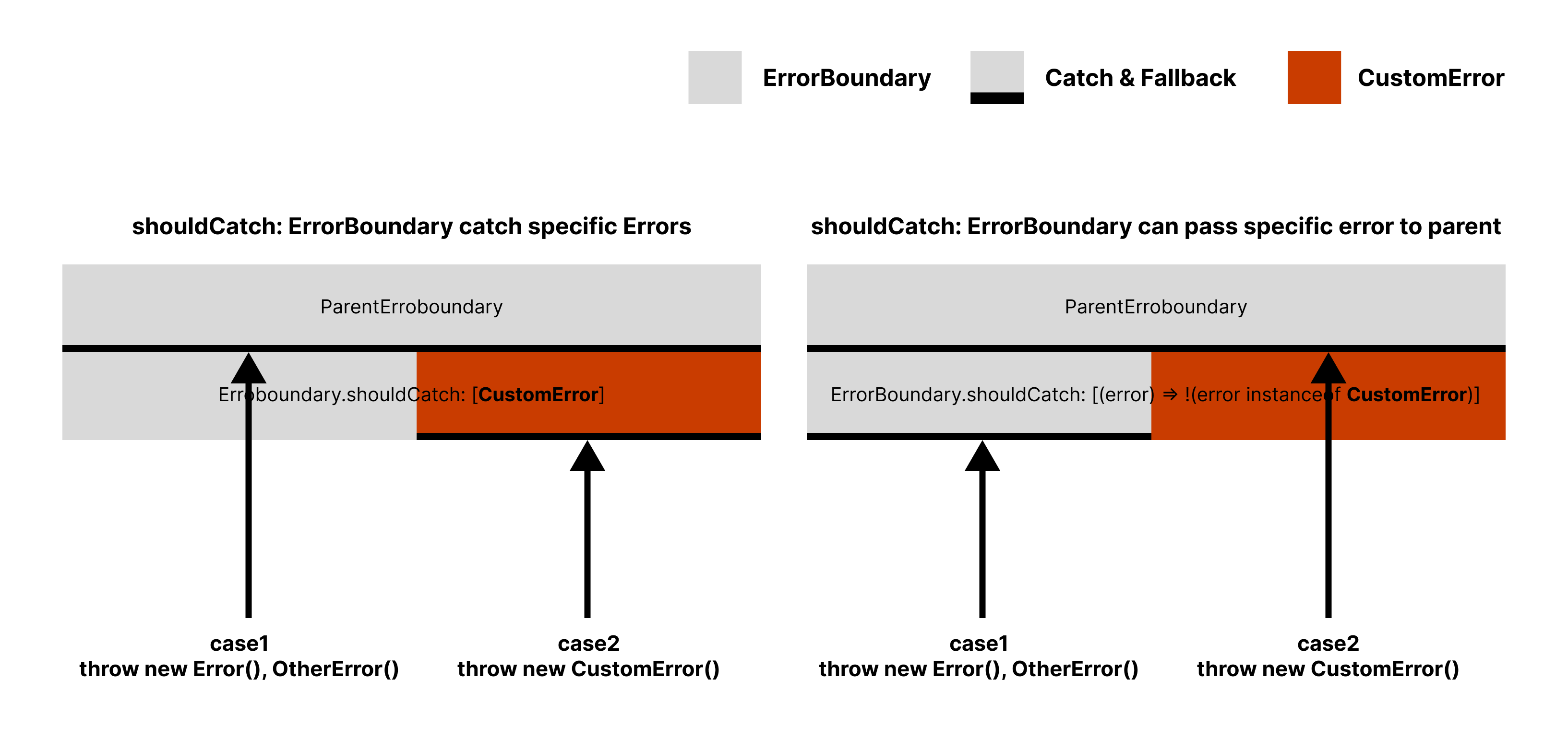
1. `shouldCatch`: ErrorConstructor
```jsx
import { ErrorBoundary } from '@suspensive/react'
class CustomError extends Error {}
const Example = () => {
return (
<>RestError: {error.message}}>
<>CustomError: {error.message}}
>
)
}
```
2. `shouldCatch`: callback
```jsx
import { ErrorBoundary } from '@suspensive/react'
class CustomError extends Error {}
const Example = () => {
return (
<>RestError: {error.message}}>
error instanceof CustomError}
onError={logOnCustomError}
fallback={({ error }) => <>CustomError: {error.message}}
>
)
}
```
3. `shouldCatch`: boolean
```jsx
import { ErrorBoundary } from '@suspensive/react'
class CustomError extends Error {}
const Example = () => {
return (
<>RestError: {error.message}}>
'2024-01-01T00:00:00.000Z'}
onError={logOnErrorAfter2024}
fallback={({ error }) => <>ErrorAfter2024: {error.message}}
>
)
}
```
### New [``](/docs/react/ErrorBoundary), [``](/docs/react/ErrorBoundaryGroup) [#610](https://github.com/toss/suspensive/pull/610)
These components can be used to use `useErrorBoundary`, `useErrorBoundaryGroup` in jsx inlinely.
```jsx
import { ErrorBoundary, ErrorBoundaryGroup } from '@suspensive/react'
const Example = () => {
return (
{({ reset }) => }
<>{error.message}}>
{({ setError }) => (
)}
)
}
```
## Handling BREAKING CHANGES
### Removed ``
We removed `` in v2. [#295](https://github.com/toss/suspensive/issues/295)
Because `` uses `` internally, it can be used with `useErrorBoundary` and is affected by ``. We decided to remove this component from v2, believing that it would be better for maintainability and interface unification for library users.
``'s feature is just wrap two component(``, ``) by one.
So, you can split by two like this.
```diff
+ import { Suspense, ErrorBoundary } from '@suspensive/react'
- import { AsyncBoundary } from '@suspensive/react'
+ } onError={onError} onReset={onReset}>
+ }>
+
+
+
- } rejectedFallback={} onError={onError} onReset={onReset}>
-
-
```
### Removed `withSuspense`, `withDelay`, `withErrorBoundary`, `withErrorBoundaryGroup`
These all HOCs can be replaced beautifully by new HOC builder [`wrap`](https://v2.suspensive.org/docs/react/wrap) in v2.
```diff
+ import { wrap } from '@suspensive/react'
- import { withSuspense, withErrorBoundary, withErrorBoundaryGroup } from '@suspensive/react'
+ const Example = wrap
+ .ErrorBoundaryGroup({ blockOutside: false })
+ .ErrorBoundary({ fallback: ({ error }) => <>{error.message}, onError: logger.log })
+ .Suspense({ fallback: <>loading..., clientOnly: true })
+ .on(() => {
+ const query = useSuspenseQuery({
+ queryKey: ['key'],
+ queryFn: () => api.text(),
+ })
+ return <>{query.data.text}
+ })
- const Example = withErrorBoundaryGroup(
- withErrorBoundary(
- withSuspense(
- () => {
- const query = useSuspenseQuery({
- queryKey: ['key'],
- queryFn: () => api.text(),
- })
- return <>{query.data.text}
- },
- { fallback: <>loading..., clientOnly: true }
- ),
- { fallback: ({ error }) => <>{error.message}, onError: logger.log }
- ),
- { blockOutside: false }
- )
```
```diff
+ import { wrap } from '@suspensive/react'
- import { withSuspense } from '@suspensive/react'
+ const Example = wrap
+ .Suspense({
+ fallback: <>loading...,
+ clientOnly: true,
+ })
+ .on(() => {
+ const query = useSuspenseQuery({
+ queryKey: ['key'],
+ queryFn: () => api.text(),
+ })
+ return <>{query.data.text}
+ })
- const Example = withSuspense(
- () => {
- const query = useSuspenseQuery({
- queryKey: ['key'],
- queryFn: () => api.text(),
- })
- return <>{query.data.text}
- },
- {
- fallback: <>loading...,
- clientOnly: true,
- }
- )
```
### Removed ``
`` just use `useErrorBoundaryGroup` internally. so We thought that changing it to something like Context.Consumer would make the component's behavior easier to understand for React developers. We changed the name to `` and kept the interface the same.
```diff
import { ErrorBoundaryGroup } from '@suspensive/react'
const Example = () => {
return (
- } />
+
+ {(group) => }
+
)
}
```
### Rename `defaultOptions` → `defaultProps` of `Suspensive`
```diff
import { ErrorBoundaryGroup } from '@suspensive/react'
const suspensive = new Suspensive({
- defaultOptions: {
+ defaultProps: {
suspense: {
fallback: 'default loading...',
},
},
})
```
### Rename `` → `` as prop
```diff
import { Suspense } from '@suspensive/react'
const Example = () => {
return (
- loading...}>
+ loading...}>
<>children
)
}
```
---
## Migrating to v3
URL: /docs/react/migration/migrate-to-v3
# Migrating to v3
## What's new
### Now thrown error in `ErrorBoundary` fallback will be passed to parent [#1409](https://github.com/toss/suspensive/pull/1409)
It is not the developer's intention to expose fallbacks recursively due to fallback errors, in v3, errors thrown from fallbacks are caught by the parent ErrorBoundary.
So this is a new mental model and a BREAKING CHANGE, please understand and use the new behavior.
> **Note:** Errors thrown from the fallback of AS-IS v2 ErrorBoundary cannot be handled by the parent ErrorBoundary, so they are caught by themselves and fallbacks are exposed recursively.
>
> > This is also the case in [react-error-boundary](https://github.com/bvaughn/react-error-boundary) where fallbacks are exposed recursively as follows.
>
> 1. children is exposed
> 2. fallback is exposed
> 3. fallback is exposed
> 4. fallback is exposed
> 5. ... recursively exposed fallback is exposed
Now, errors thrown from the fallback of ErrorBoundary are caught by the parent ErrorBoundary. Therefore, the behavior is as follows.
1. children are exposed
2. fallback is exposed
3. This is expected
```tsx /This is expected/ /fallback is exposed/ /children is exposed/
const Example = () => (
<>This is expected}>
(
fallback is exposed
)}
>
children is exposed
)
const Throw = {
Error: ({
message,
after = 0,
children,
}: PropsWithChildren<{ message: string; after?: number }>) => {
const [isNeedThrow, setIsNeedThrow] = useState(after === 0)
if (isNeedThrow) {
throw new Error(message)
}
useTimeout(() => setIsNeedThrow(true), after)
return <>{children}
},
}
```
### Now `Delay`'s children render prop can use the isDelayed flag. [#1312](https://github.com/toss/suspensive/pull/1312)
The `Delay` component now allows you to use the `isDelayed` flag in the render prop of its children. This flag can be used to check if the delay has ended.
When we use Skeleton UI for Suspense's fallback, it is better to give a delay of about 200ms and make the skeleton fade-in rather than showing it right away.
At this time we can use the `isDelayed` flag to control the opacity of the skeleton. This allows us to reduce layout shifts while improving user experience.
```tsx
import { Delay } from '@suspensive/react'
const Example = () => (
{({ isDelayed }) => (
)}
}
>
)
```
## Handling BREAKING CHANGES
### Remove `wrap` & Add `with` [#1452](https://github.com/toss/suspensive/pull/1452)
`wrap` has been removed in v3. We added a `with` method to each component that can replace the functionality of wrap.
1. You don't need to understand the builder pattern used in wrap.
2. Since wrap includes all components internally, the build size increases. In v3, you can import and use only the components you need.
```diff
+ import { ErrorBoundaryGroup, ErrorBoundary, Suspense } from '@suspensive/react'
- import { wrap } from '@suspensive/react'
import { useSuspenseQuery } from '@suspensive/react-query'
+ const Example = ErrorBoundaryGroup.with(
+ { blockOutside: false },
+ ErrorBoundary.with(
+ { fallback: ({ error }) => <>{error.message}, onError: logger.log },
+ Suspense.with({ fallback: <>loading..., clientOnly: true }, () => {
+ const query = useSuspenseQuery({
+ queryKey: ['key'],
+ queryFn: () => api.text(),
+ })
+ return <>{query.data.text}
+ })
+ )
+ )
- const Example = wrap
- .ErrorBoundaryGroup({ blockOutside: false })
- .ErrorBoundary({
- fallback: ({ error }) => <>{error.message},
- onError: logger.log,
- })
- .Suspense({ fallback: <>loading..., clientOnly: true })
- .on(() => {
- const query = useSuspenseQuery({
- queryKey: ['key'],
- queryFn: () => api.text(),
- })
- return <>{query.data.text}
- })
```
---
## Motivation
URL: /docs/react-query/motivation
# Motivation
TanStack Query is powerful, but using it in real applications reveals friction — hooks force unnecessary component splits, server-side prefetching requires boilerplate, and some APIs are simply missing. @suspensive/react-query removes that friction.
### Hooks force you to split components
To use `useSuspenseQuery`, you must create a separate child component below ``. With Suspensive's [``](/docs/react-query/SuspenseQuery), data fetching lives right in JSX — no wrapper components, no artificial nesting.
The same applies to mutations and prefetching. With Suspensive's [``](/docs/react-query/Mutation) and [``](/docs/react-query/PrefetchQuery), you can use them inline, even inside loops and conditionals where hooks can't go.
### Server-side prefetching is too much boilerplate
Creating a `QueryClient`, calling `ensureQueryData` for each query, wrapping with `HydrationBoundary` — it adds up fast. With Suspensive's [``](/docs/react-query/QueriesHydration), you declare your queries once and it handles prefetching, dehydration, and hydration automatically.
### Server-side prefetching fails silently
When `ensureQueryData` fails on the server, you have to write try-catch logic, render a fallback, and decide whether to retry on the client — for every query. With Suspensive's [``](/docs/react-query/QueriesHydration), `skipSsrOnError` handles all of this: it can skip SSR and retry in the browser, or show a custom fallback while the client takes over. Combined with `timeout`, slow queries gracefully fall back to client-side rendering instead of blocking the entire page.
### QueryClient leaks across requests on the server
A shared `QueryClient` on the server means data from one user's request can leak into another's. With Suspensive's [`createGetQueryClient`](/docs/react-query/createGetQueryClient), you get a new instance per server request and a singleton in the browser — with safe GC defaults built in.
### v5 drops support for older browsers
TanStack Query v5 requires Safari >= 15 due to ES private fields, but many teams still need to support Safari 12–14. By [installing @suspensive/react-query-4](/docs/react-query/installation), you get the v5 interface while keeping older browser compatibility.
Browser compatibility comparison
TanStack Query Browser Requirements
v4
v5
{[
{ browser: 'Chrome', version4: '>= 73', version5: '>= 91' },
{ browser: 'Firefox', version4: '>= 78', version5: '>= 90' },
{ browser: 'Edge', version4: '>= 79', version5: '>= 91' },
{ browser: 'Safari', version4: '>= 12.1', version5: '>= 15' },
{ browser: 'iOS', version4: '>= 12.2', version5: '>= 15' },
{ browser: 'Opera', version4: '>= 53', version5: '>= 77' },
].map((item) => (
{item.browser}
{item.version4}
{item.version5}
))}
### Official TanStack Query community resource
@suspensive/react-query is registered as an official [TanStack Query community resource](https://tanstack.com/query/v4/docs/framework/react/community/suspensive-react-query). We actively maintain it and provide prompt support for issues.
---
## Installation
URL: /docs/react-query/installation
# Installation
### Check supported browsers
Suspensive Libraries are optimized for modern browsers. It is compatible with the following browsers config.
{[
{ browser: 'Chrome', version: '>= 51' },
{ browser: 'Firefox', version: '>= 53' },
{ browser: 'Edge', version: '>= 18' },
{ browser: 'Safari', version: '>= 11' },
{ browser: 'iOS', version: '>= 11' },
{ browser: 'Opera', version: '>= 38' },
].map((item) => (
{item.browser}
{item.version}
))}
> Depending on your environment, you might need to add polyfills. If you want to support older browsers, you need to transpile the library from node_modules yourselves.
### Check supported react, @tanstack/react-query version
{[
{ library: 'react', version: '^18 || ^19' },
{ library: '@tanstack/react-query', version: '^4 || ^5' },
].map((item) => (
{item.library}
{item.version}
))}
### Add as Dependencies
Install the package that matches your @tanstack/react-query version.
#### @tanstack/react-query v5
```shell npm2yarn
npm install @suspensive/react-query@npm:@suspensive/react-query-5 @tanstack/react-query@5
```
#### @tanstack/react-query v4
@tanstack/react-query v4 supports [lower version browsers](/docs/react-query/motivation#v5-drops-support-for-older-browsers) compared to v5.
```shell npm2yarn
npm install @suspensive/react-query@npm:@suspensive/react-query-4 @tanstack/react-query@4
```
> **Info:** By using npm aliases, the import path remains `@suspensive/react-query` across your codebase. When upgrading your @tanstack/react-query version, you only need to change the alias in package.json — no code changes required.
---
## SuspenseQuery
URL: /docs/react-query/SuspenseQuery
# SuspenseQuery
We provide these components to clearly express what causes suspense at the same depth.
1. Prop-drilling resulting from removing depth such as UserInfo and PostList for data-fetching only is also removed.
2. Changing the range of Suspense and ErrorBoundary becomes simple. Parallel processing of queries is also easier.
3. Because it manages all data-fetching within the Page component, the internal components are presentational, so it is easy to separate the components.
```jsx /SuspenseQuery/
import { SuspenseQuery } from '@suspensive/react-query'
import { Suspense, ErrorBoundary } from '@suspensive/react'
import { PostListItem, UserProfile } from '~/components'
const PostsPage = ({ userId }) => (
<>{error.message}}>
{({ data: user }) => }
posts.filter(({ isPublic }) => isPublic)}
>
{({ data: posts }) =>
posts.map((post) => )
}
)
```
## Motivation: useSuspenseQuery is not obvious
Because the existing useSuspenseQuery is a hook, it creates components with names such as UserInfo and PostList to place Suspense and ErrorBoundary on the parent.
This makes it difficult to predict what suspense and errors will be thrown inside UserInfo and PostList.
```jsx
// posts/page.tsx
import { Suspense, ErrorBoundary } from '@suspensive/react'
import { UserInfo } from './components/UserInfo'
import { PostList } from './components/PostList'
const PostsPage = ({ userId }) => (
<>{error.message}}>
{/* It is difficult to predict whether a suspension will occur internally. */}
{/* It is difficult to predict whether a suspension will occur internally. */}
)
```
```jsx /useSuspenseQuery/
// posts/components/UserInfo.tsx
import { useSuspenseQuery } from '@suspensive/react-query'
import { UserProfile } from '~/components'
// From the perspective of using this component, it is impossible to predict whether Suspense will occur internally just by the name UserInfo.
const UserInfo = ({ userId }) => {
// We need to create this component just for data-fetching.
const { data: user } = useSuspenseQuery(userQueryOptions(userId))
return
}
```
```jsx /useSuspenseQuery/
// posts/components/PostList.tsx
import { useSuspenseQuery } from '@suspensive/react-query'
import { PostListItem } from '~/components'
// From the perspective of using this component, it is impossible to predict whether a suspense will occur internally based on the name PostList alone.
const PostList = ({ userId }) => {
// We need to create this component just for data-fetching.
const { data: posts } = useSuspenseQuery({
...postsQueryOptions(userId),
select: (posts) => posts.filter(({ isPublic }) => isPublic),
})
return (
<>
{posts.map((post) => (
))}
)
}
```
### Version History
| Version | Changes |
| -------- | ----------------------------------------------------------------------------------------------------------------------------------------- |
| `v3.0.0` | `networkMode` has been fixed to `'always'`. For more details, please refer to the [Migration to v3 guide](./migration/migrate-to-v3.mdx). |
---
## SuspenseQueries
URL: /docs/react-query/SuspenseQueries
# SuspenseQueries
Just as [``](/docs/react-query/SuspenseQuery) makes useSuspenseQuery easier to use in jsx, `` serves to make useSuspenseQueries easier to use in jsx.
```jsx /SuspenseQueries/
import { SuspenseQueries } from '@suspensive/react-query'
import { Suspense, ErrorBoundary } from '@suspensive/react'
import { PostListItem, UserProfile } from '~/components'
const PostsPage = ({ userId }) => (
<>{error.message}}>
{([{ data: user }, { data: posts }]) => (
<>
{}
{posts.map((post) => (
))}
)}
)
```
### Version History
| Version | Changes |
| -------- | ----------------------------------------------------------------------------------------------------------------------------------------- |
| `v3.0.0` | `networkMode` has been fixed to `'always'`. For more details, please refer to the [Migration to v3 guide](./migration/migrate-to-v3.mdx). |
---
## SuspenseInfiniteQuery
URL: /docs/react-query/SuspenseInfiniteQuery
# SuspenseInfiniteQuery
Just as [``](/docs/react-query/SuspenseQuery) makes useSuspenseQuery easier to use in jsx, `` serves to make useSuspenseInfiniteQuery easier to use in jsx.
```jsx /SuspenseInfiniteQuery/
import { SuspenseInfiniteQuery } from '@suspensive/react-query'
import { Suspense, ErrorBoundary } from '@suspensive/react'
import { PostListItem } from '~/components'
const InfinitePostsPage = ({ userId }) => (
<>{error.message}}>
{({ data, fetchNextPage }) => (
<>
{data.pages.map((post) => (
))}
)}
)
```
### Version History
| Version | Changes |
| -------- | ----------------------------------------------------------------------------------------------------------------------------------------- |
| `v3.0.0` | `networkMode` has been fixed to `'always'`. For more details, please refer to the [Migration to v3 guide](./migration/migrate-to-v3.mdx). |
---
## Mutation
URL: /docs/react-query/Mutation
# Mutation
Similar to how [``](/docs/react-query/SuspenseQuery) allows `useSuspenseQuery` to be used at the same depth, `` facilitates the use of `useMutation` at the same depth.
```jsx /Mutation/
import { Mutation } from '@suspensive/react-query'
import { useSuspenseQuery } from '@tanstack/react-query'
const PostsPage = () => {
const { data: posts } = useSuspenseQuery({
queryKey: ['posts'],
queryFn: () => getPosts(),
});
return posts.map(post => (
api.editPost({ postId: post.id, content })}
>
{postMutation => (
<>